
diff options
| author | ruki <[email protected]> | 2017-02-04 18:30:58 +0800 |
|---|---|---|
| committer | ruki <[email protected]> | 2017-02-04 18:30:58 +0800 |
| commit | e2dc295dc57175643764f9fe126a4a183663239b (patch) | |
| tree | 3f6e4c4404855e20327257a1b7436319d4a67942 /docs | |
| parent | a8ae252e9270414f8c7598ec41156d1bbcf6dbbf (diff) | |
write README for docs
Diffstat (limited to 'docs')
| -rw-r--r-- | docs/README.md | 318 | ||||
| -rw-r--r-- | docs/articles.md (renamed from docs/apis.md) | 0 | ||||
| -rw-r--r-- | docs/config.js | 16 | ||||
| -rw-r--r-- | docs/index.html | 1 | ||||
| -rw-r--r-- | docs/manual.md | 4 | ||||
| -rwxr-xr-x | docs/zh/README.md | 327 | ||||
| -rwxr-xr-x | docs/zh/articles.md (renamed from docs/zh/apis.md) | 0 | ||||
| -rwxr-xr-x | docs/zh/manual.md | 5 |
8 files changed, 356 insertions, 315 deletions
diff --git a/docs/README.md b/docs/README.md index f71ff66e3..8bd98f014 100644 --- a/docs/README.md +++ b/docs/README.md @@ -6,231 +6,251 @@ search: english [](https://travis-ci.org/tboox/xmake) [](https://ci.appveyor.com/project/waruqi/xmake/branch/master) [](https://gitter.im/waruqi/tboox?utm_source=badge&utm_medium=badge&utm_campaign=pr-badge&utm_content=badge) [](http://xmake.io/pages/donation.html#donate) -## Introduction ([中文](/README_zh.md)) +## Introduction xmake is a make-like build utility based on lua. The project focuses on making development and building easier and provides many features (.e.g package, install, plugin, macro, action, option, task ...), so that any developer can quickly pick it up and enjoy the productivity boost when developing and building project. -If you want to known more, please refer to: +## Installation -* [Documents](https://github.com/waruqi/xmake/wiki/%E7%9B%AE%E5%BD%95) -* [Github](https://github.com/waruqi/xmake) -* [HomePage](http://www.xmake.io) +#### Windows -#### Features +1. Download xmake installer ([Releases](https://github.com/tboox/xmake/releases)) +2. Run xmake-[version].exe -- Create projects and supports many project templates -- Support c/c++, objc/c++, swift and assembly language -- Automatically probe the host environment and configure project -- Provide some built-in actions (config, build, package, clean, install, uninstall and run) -- Provide some built-in plugins (doxygen, macro, project) -- Provide some built-in macros (batch packaging) -- Describe the project file using lua script, more flexible and simple -- Custom packages, platforms, plugins, templates, tasks, macros, options and actions -- Do not generate makefile and build project directly -- Support multitasking with argument: -j -- Check includes dependence automatically -- Run and debug the target program -- Generate IDE project file +#### MacOS -#### Actions - -- config: Configure project before building. -- global: Configure the global options for xmake. -- build: Build project. -- clean: Remove all binary and temporary files. -- create: Create a new project using template. -- package: Package the given target -- install: Install the project binary files. -- uninstall: Uninstall the project binary files. -- run: Run the project target. - -#### Plugins - -- The doxygen plugin: Make doxygen document from source codes -- The macro plugin: Record and playback commands -- The hello plugin: A simple plugin demo to show 'hello xmake!' -- The project plugin: Create the project file for IDE (.e.g makefile, vs2002 - vs2017) +```bash +$ ruby -e "$(curl -fsSL https://raw.githubusercontent.com/Homebrew/install/master/install)" +$ sudo brew install xmake +``` -#### Languages +#### Linux -- C/C++ -- Objc/Objc++ -- Swift -- Assembly +```bash +$ ruby -e "$(curl -fsSL https://raw.githubusercontent.com/Homebrew/linuxbrew/go/install)" +$ sudo brew install xmake +``` -#### Platforms +#### Compilation -- Windows (x86, x64, amd64, x86_amd64) -- Macosx (i386, x86_64) -- Linux (i386, x86_64, cross-toolchains ...) -- Android (armv5te, armv6, armv7-a, armv8-a, arm64-v8a) -- iPhoneos (armv7, armv7s, arm64, i386, x86_64) -- Watchos (armv7k, i386) -- Mingw (i386, x86_64) +```bash +$ git clone [email protected]:waruqi/xmake.git +$ cd ./xmake +$ sudo ./install +``` -#### Todolist +## Quick Start -- Manage package and dependencies -- Download package automatically -- Create package repository for porting other third-party source codes, it's goal is that one people port it and many people shared. -- Implement more plugins(.e.g generate .deb, .rpm package) +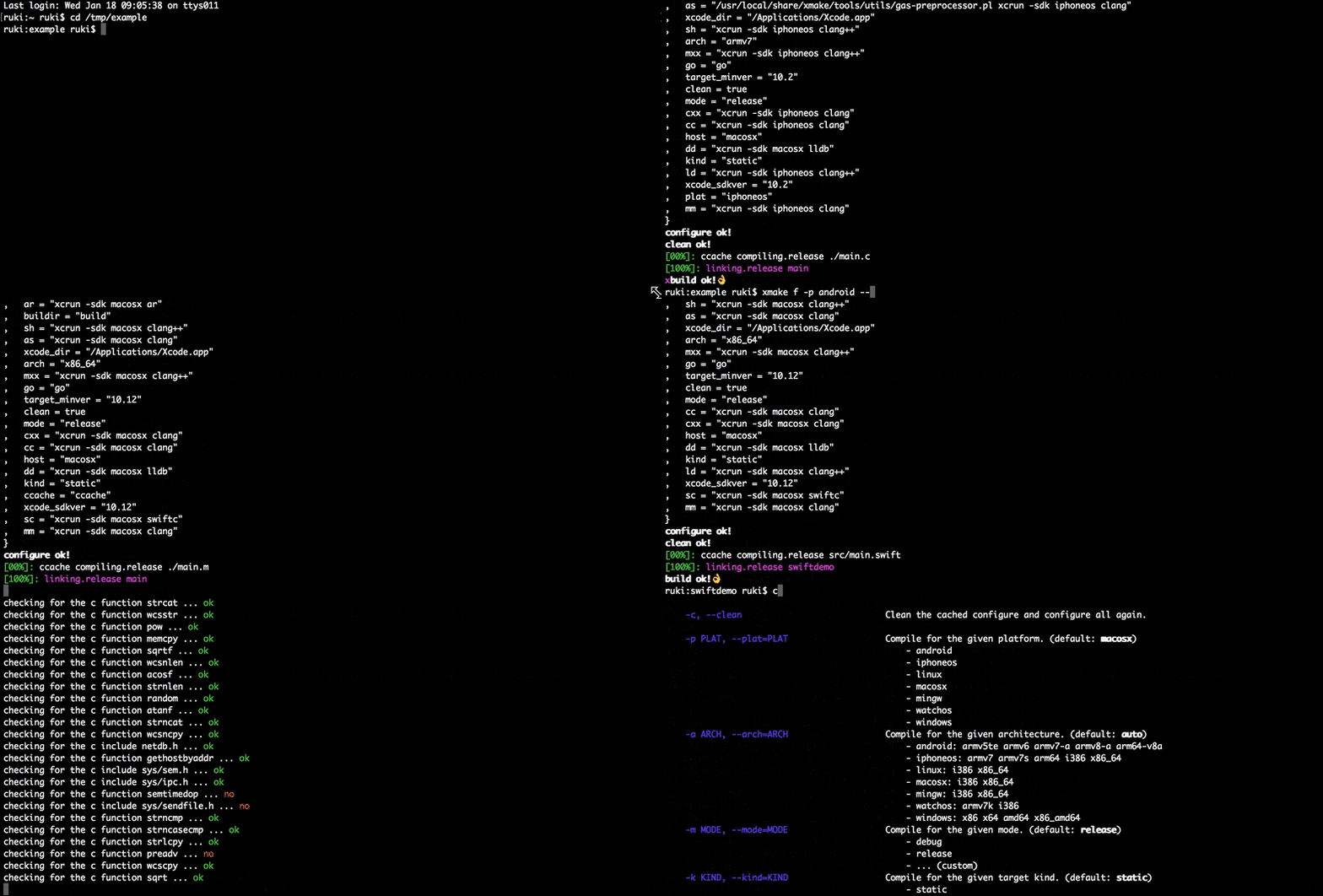 -#### Examples +#### Create Empty Project -[](http://www.xmake.io) +```bash +$ xmake create -P ./hello +``` -Create a c++ console project: +And xmake will generate some files: -```bash - xmake create -l c++ -t 1 console - or xmake create --language=c++ --template=1 console +``` +hello +├── src +│ └── main.c +└── xmake.lua ``` -Project xmakefile: xmake.lua +It is a simple console program only for printing `hello xmake!` + +The content of `xmake.lua` is very simple: ```lua -target("console") +target("hello") set_kind("binary") add_files("src/*.c") ``` -Configure project: +<p class="tip"> + If you want to known more options, please run: `xmake create --help` +</p> + +#### Build Project + +```bash +$ xmake +``` + +#### Run Program -This is optional, if you compile the targets only for linux, macosx and windows and the default compilation mode is release. +```bash +$ xmake run hello +``` + +#### Debug Program ```bash - xmake f -p iphoneos -m debug -or xmake f --plat=macosx --arch=x86_64 -or xmake f -p windows -or xmake config --plat=iphoneos --mode=debug -or xmake config --plat=android --arch=armv7-a --ndk=xxxxx -or xmake config -p linux -a i386 -or xmake config -p mingw --cross=i386-mingw32- --toolchains=/xxx/bin -or xmake config -p mingw --sdk=/mingwsdk -or xmake config --help +$ xmake run -d hello ``` -Compile project: +It will start the debugger (.e.g lldb, gdb, windbg, vsjitdebugger, ollydbg ..) to load our program. ```bash - xmake -or xmake -r -or xmake --rebuild +[lldb]$target create "build/hello" +Current executable set to 'build/hello' (x86_64). +[lldb]$b main +Breakpoint 1: where = hello`main, address = 0x0000000100000f50 +[lldb]$r +Process 7509 launched: '/private/tmp/hello/build/hello' (x86_64) +Process 7509 stopped +* thread #1: tid = 0x435a2, 0x0000000100000f50 hello`main, queue = 'com.apple.main-thread', stop reason = breakpoint 1.1 + frame #0: 0x0000000100000f50 hello`main +hello`main: +-> 0x100000f50 <+0>: pushq %rbp + 0x100000f51 <+1>: movq %rsp, %rbp + 0x100000f54 <+4>: leaq 0x2b(%rip), %rdi ; "hello world!" + 0x100000f5b <+11>: callq 0x100000f64 ; symbol stub for: puts +[lldb]$ ``` -Run target: +<p class="tip"> + You can also use short command option, for exmaple: `xmake r` or `xmake run` +</p> + +## Configuration + +### Target Platforms + +#### Current Host ```bash - xmake r console -or xmake run console +$ xmake ``` -Debug target: +<p class="tip"> + XMake will detect the current host platform automatically and build project. +</p> + +#### Linux ```bash - xmake r -d console -or xmake run -d console +$ xmake f -p linux [-a i386|x86_64] +$ xmake ``` -Package all: +#### Android ```bash - xmake p -or xmake package -or xmake package console -or xmake package -o /tmp -or xmake package --output=/tmp +$ xmake f -p android --ndk=~/files/android-ndk-r10e/ [-a armv5te|armv6|armv7-a|armv8-a|arm64-v8a] +$ xmake ``` -Package all archs using macro: - +#### iPhoneOS + ```bash - xmake m package -or xmake m package -p iphoneos -or xmake m package -p macosx -f "-m debug" -o /tmp/ -or xmake m package --help +$ xmake f -p iphoneos [-a armv7|armv7s|arm64|i386|x86_64] +$ xmake ``` -Install targets: +#### Windows ```bash - xmake i -or xmake install -or xmake install console -or xmake install -o /tmp -or xmake install --output=/tmp +$ xmake f -p windows [-a x86|x64] +$ xmake ``` -If you need known more detailed usage,please refer to [documents](https://github.com/waruqi/xmake/wiki/documents) -or run: +#### Mingw ```bash - xmake -h -or xmake --help -or xmake config --help -or xmake package --help -or xmake macro --help -... +$ xmake f -p mingw --sdk=/usr/local/i386-mingw32-4.3.0/ [-a i386|x86_64] +$ xmake +``` + +#### Apple WatchOS + +```bash +$ xmake f -p watchos [-a i386|armv7k] +$ xmake ``` -The simple xmake.lua file: +#### Cross Compilation -```c --- the debug mode -if is_mode("debug") then - - -- enable the debug symbols - set_symbols("debug") +```bash +$ xmake f -p linux --sdk=/usr/local/arm-linux-gcc/ [--toolchains=/sdk/bin] [--cross=arm-linux-] +$ xmake +``` - -- disable optimization - set_optimize("none") -end +<p class="tip"> + You can use short or long command option, for exmaple: <br> + `xmake f` or `xmake config`.<br> + `xmake f -p linux` or `xmake config --plat=linux`.<br> + `xmake f -p linux -a i386` or `xmake config --plat=linux --arch=i386`.<br> + <br> + And if you want to known more options, please run: `xmake f --help` +</p> --- the release mode -if is_mode("release") then +### Global Configuration - -- set the symbols visibility: hidden - set_symbols("hidden") +You can save to the global configuration for simplfying operation. - -- enable fastest optimization - set_optimize("fastest") +For example: - -- strip all symbols - set_strip("all") -end +```bash +$ xmake g --ndk=~/files/android-ndk-r10e/ +``` + +Now, we config and build project for android again. + +```bash +$ xmake f -p android +$ xmake +``` --- add target -target("test") +<p class="tip"> + You can use short or long command option, for exmaple: `xmake g` or `xmake global`.<br> +</p> - -- set kind - set_kind("static") +### Clean Configuration - -- add files - add_files("src/*.c") +We can clean all cached configuration and re-configure projecct. + +```bash +$ xmake f -c +$ xmake +``` + +or + +```bash +$ xmake f -p iphoneos -c +$ xmake ``` -If you want to know more, please refer to: +## FAQ -#### Documents +#### How to get verbose command-line arguments info? -* [Documents](https://github.com/waruqi/xmake/wiki/documents) -* [Codes](https://github.com/waruqi/xmake) +Get the help info of the main command. -#### Projects +```bash +$ xmake [-h|--help] +``` + +Get the help info of the configuration command. + +```bash +$ xmake f [-h|--help] +``` -Some projects using xmake: +Get the help info of the givent action or plugin command. -* [tbox](https://github.com/waruqi/tbox) -* [gbox](https://github.com/waruqi/gbox) -* [libsvx](https://github.com/caikelun/libsvx) -* [more](https://github.com/waruqi/xmake/wiki/xmake-projects) +```bash +$ xmake [action|plugin] [-h|--help] +``` -#### Contacts +For example: -* Email:[[email protected]](mailto:[email protected]) -* Homepage:[TBOOX Open Source Project](http://www.tboox.org/cn) -* Community:[TBOOX Open Source Community](http://www.tboox.org/forum) +```bash +$ xmake run --help +``` diff --git a/docs/apis.md b/docs/articles.md index 616f7068c..616f7068c 100644 --- a/docs/apis.md +++ b/docs/articles.md diff --git a/docs/config.js b/docs/config.js index 95f00ef23..8406ddc78 100644 --- a/docs/config.js +++ b/docs/config.js @@ -18,7 +18,13 @@ self.$config = { title: 'Plugins', path: '/plugins' }, { - title: 'Api Manual', path: '/apis' + title: 'Manual', path: '/manual' + }, + { + title: 'Articles', path: '/articles' + }, + { + title: 'Blog', path: 'http://www.tboox.org' }, { title: '中文', type: 'dropdown', items: langs, exact: true @@ -32,7 +38,13 @@ self.$config = { title: '插件', path: '/zh/plugins' }, { - title: 'Api手册', path: '/zh/apis' + title: '手册', path: '/zh/manual' + }, + { + title: '文章', path: '/zh/articles' + }, + { + title: '博客', path: 'http://www.tboox.org/cn' }, { title: 'English', type: 'dropdown', items: langs, exact: true diff --git a/docs/index.html b/docs/index.html index 3286f59af..b3908004b 100644 --- a/docs/index.html +++ b/docs/index.html @@ -15,6 +15,7 @@ <script src="https://unpkg.com/docute@2/dist/docute.js"></script> <!-- don't remove this part end --> <script src="https://unpkg.com/[email protected]/components/prism-c.min.js"></script> + <script src="https://unpkg.com/[email protected]/components/prism-lua.min.js"></script> <script src="https://unpkg.com/[email protected]/components/prism-bash.min.js"></script> </body> </html> diff --git a/docs/manual.md b/docs/manual.md new file mode 100644 index 000000000..616f7068c --- /dev/null +++ b/docs/manual.md @@ -0,0 +1,4 @@ +--- +search: english +--- + diff --git a/docs/zh/README.md b/docs/zh/README.md index eb9003947..dd943f0f7 100755 --- a/docs/zh/README.md +++ b/docs/zh/README.md @@ -20,248 +20,247 @@ xmake的目标是开发者更加关注于项目本身开发,简化项目的描 不仅如此,它还提供了许多更加高级的特性,例如插件扩展、脚本宏记录、批量打包、自动文档生成等等。。 -如果你想要了解更多,请参考: +## 安装 -* [在线文档](https://github.com/waruqi/xmake/wiki/%E7%9B%AE%E5%BD%95) -* [在线源码](https://github.com/waruqi/xmake) -* [项目主页](http://www.xmake.io/cn) +#### Windows -#### 支持特性 +1. 从 ([Releases](https://github.com/tboox/xmake/releases)) 上下载windows安装包 +2. 运行安装程序 xmake-[version].exe -- 支持windows、mac、linux、ios、android等平台,自动检测不同平台上的编译工具链(也可手动配置) - 编译windows项目采用原生vs的工具链,不需要使用cygwin、mingw(当然这些也支持) +#### MacOS -- 支持自定义平台编译配置,可以很方便的扩展第三方平台支持 - -- 采用lua脚本语法描述项目,描述规则简单高效,逻辑规则可灵活修改,并且不会生成相关平台的工程文件,是工程更加简单明了 - -- 支持创建模板工程、配置项目、编译项目、运行、打包、安装和卸载等常用功能(后续还会增加:自动生成文档、调试等模块) - -- 支持编译c/c++/objc/swift成静态库、动态库、命令行可执行程序 - -- 提供丰富的工程描述api,使用简单灵活,例如添加编译文件只需(还支持过滤排除): +```bash +$ ruby -e "$(curl -fsSL https://raw.githubusercontent.com/Homebrew/install/master/install)" +$ sudo brew install xmake +``` - `add_files("src/*.c", "src/asm/**.S", "src/*.m")` +#### Linux -- 支持头文件、接口、链接库依赖、类型的自动检测,并可自动生成配置头文件config.h +```bash +$ ruby -e "$(curl -fsSL https://raw.githubusercontent.com/Homebrew/linuxbrew/go/install)" +$ sudo brew install xmake +``` -- 支持自定义编译配置开关,例如如果在工程描述文件中增加了`enable_xxx`的开关,那么配置编译的时候就可以手动进行配置来启用它: +#### 编译安装 - `xmake config --enable_xxx=y` +```bash +$ git clone [email protected]:waruqi/xmake.git +$ cd ./xmake +$ sudo ./install +``` -- 提供一键打包功能,不管在哪个平台上进行打包,都只需要执行一条相同的命令,非常的方便 +## 快速开始 -- 支持全局配置,一些常用的项目配置,例如工具链、规则描述等等,都可以进行全局配置,这样就不需要每次编译不同工程,都去配置一遍 + -- 除了可以自动检测依赖模块,也支持手动强制配置模块,还有各种编译flags。 +#### 创建空工程 -- 支持插件扩展、平台扩展、模板扩展、选项自定义等高级功能 +创建一个名叫`hello`的控制台工程: -- 提供一些内置的常用插件(例如:自动生成doxygen文档插件,宏脚本记录和运行插件) +```bash +$ xmake create -P ./hello +``` -- 宏记录插件里面提供了一些内置的宏脚本(例如:批量打包一个平台的所有archs等),也可以在命令行中手动记录宏并回放执行 +执行完后,将会生成一个简单工程结构: -- 提供强大的task任务机制 +``` +hello +├── src +│ └── main.c +└── xmake.lua +``` -- 不依赖makefile和make,实现直接编译,内置自动多任务加速编译, xmake是一个真正的构架工具,而不仅仅是一个工程文件生成器 +其中`xmake.lua`是工程描述文件,内容非常简单,告诉xmake添加`src`目录下的所有`.c`源文件: -- 自动检测ccache,进行自动缓存提升构建速度 +```lua +target("hello") + set_kind("binary") + add_files("src/*.c") +``` -- 自动检测头文件依赖,并且快速自动构建修改的文件 +<p class="tip"> + 如果你想了解更多参数选项,请运行: `xmake create --help` +</p> -- 调试器支持,实现直接加载运行调试 +#### 构建工程 -- 提供产生IDE工程文件的插件(支持vs2002 - vs2017) +```bash +$ xmake +``` -#### 常用Actions +#### 运行程序 -- config: 构建之前的编译参数配置 -- global: 配置一些全局参数 -- build: 构建项目 -- clean: 清理一些二进制文件、临时文件 -- create: 使用模板创建新工程 -- package: 打包指定目标 -- install: 安装编译后的目标文件 -- uninstall: 卸载安装的所有文件 -- run: 运行可执行的项目目标 +```bash +$ xmake run hello +``` -#### 一些内置插件 +#### 调试程序 -- doxygen文档生成插件: 从指定源码目录生成doxygen文档 -- 宏记录脚本插件: 记录和回放宏脚本,简化重复的命令操作(例如:批量打包。。) -- hello插件: 插件开发demo -- 工程文件生成插件: 创建IDE的工程文件 (目前支持:makefile, vs2002 - vs2017,后续支持:xcode等等) -- iOS app2ipa插件 +```bash +$ xmake run -d hello +``` -#### 支持编译语言 +xmake将会使用系统自带的调试器去加载程序运行,目前支持:lldb, gdb, windbg, vsjitdebugger, ollydbg 等各种调试器。 -- C/C++ -- Objc/Objc++ -- Swift -- Assembly +```bash +[lldb]$target create "build/hello" +Current executable set to 'build/hello' (x86_64). +[lldb]$b main +Breakpoint 1: where = hello`main, address = 0x0000000100000f50 +[lldb]$r +Process 7509 launched: '/private/tmp/hello/build/hello' (x86_64) +Process 7509 stopped +* thread #1: tid = 0x435a2, 0x0000000100000f50 hello`main, queue = 'com.apple.main-thread', stop reason = breakpoint 1.1 + frame #0: 0x0000000100000f50 hello`main +hello`main: +-> 0x100000f50 <+0>: pushq %rbp + 0x100000f51 <+1>: movq %rsp, %rbp + 0x100000f54 <+4>: leaq 0x2b(%rip), %rdi ; "hello world!" + 0x100000f5b <+11>: callq 0x100000f64 ; symbol stub for: puts +[lldb]$ +``` -#### 支持的构建平台 +<p class="tip"> + 你也可以使用简写的命令行选项,例如: `xmake r` 或者 `xmake run` +</p> -- Windows (x86, x64, amd64, x86_amd64) -- Macosx (i386, x86_64) -- Linux (i386, x86_64, cross-toolchains ...) -- Android (armv5te, armv6, armv7-a, armv8-a, arm64-v8a) -- iPhoneos (armv7, armv7s, arm64, i386, x86_64) -- Watchos (armv7k, i386) -- Mingw (i386, x86_64) +## 配置 -#### 后续任务 +### 目标平台 -- 自动包依赖管理和下载 -- 创建移植仓库,实现`一人移植,多人共享` -- 更多的插件开发(例如:Xcode工程生成,生成.deb, .rpm的安装包) +#### 主机平台 -#### 简单例子 +```bash +$ xmake +``` -[](http://www.xmake.io/cn) +<p class="tip"> + xmake将会自动探测当前主机平台,默认自动生成对应的目标程序。 +</p> -创建一个c++ console项目: +#### Linux ```bash - xmake create -l c++ -t 1 console -or xmake create --language=c++ --template=1 console +$ xmake f -p linux [-a i386|x86_64] +$ xmake ``` -工程描述文件:xmake.lua +#### Android -```lua -target("console") - set_kind("binary") - add_files("src/*.c") +```bash +$ xmake f -p android --ndk=~/files/android-ndk-r10e/ [-a armv5te|armv6|armv7-a|armv8-a|arm64-v8a] +$ xmake ``` -配置工程: - - 这个是可选的步骤,如果只想编译当前主机平台的项目,是可以不用配置的,默认编译release版本。 +#### iPhoneOS ```bash - xmake f -p iphoneos -m debug -or xmake f --plat=macosx --arch=x86_64 -or xmake f -p windows -or xmake config --plat=iphoneos --mode=debug -or xmake config --plat=android --arch=armv7-a --ndk=xxxxx -or xmake config -p linux -a i386 -or xmake config -p mingw --cross=i386-mingw32- --toolchains=/xxx/bin -or xmake config -p mingw --sdk=/mingwsdk -or xmake config --help +$ xmake f -p iphoneos [-a armv7|armv7s|arm64|i386|x86_64] +$ xmake ``` -编译工程: - +#### Windows + ```bash - xmake -or xmake -r -or xmake --rebuild +$ xmake f -p windows [-a x86|x64] +$ xmake ``` -运行目标: +#### Mingw ```bash - xmake r console -or xmake run console -``` +$ xmake f -p mingw --sdk=/usr/local/i386-mingw32-4.3.0/ [-a i386|x86_64] +$ xmake +``` -调试目标: +#### Apple WatchOS ```bash - xmake r -d console -or xmake run -d console +$ xmake f -p watchos [-a i386|armv7k] +$ xmake ``` -打包所有: +#### 交叉编译 ```bash - xmake p -or xmake package -or xmake package console -or xmake package -o /tmp -or xmake package --output=/tmp -``` +$ xmake f -p linux --sdk=/usr/local/arm-linux-gcc/ [--toolchains=/sdk/bin] [--cross=arm-linux-] +$ xmake +``` + +<p class="tip"> + 你可以使用命令行缩写来简化输入,也可以使用全名,例如: <br> + `xmake f` 或者 `xmake config`.<br> + `xmake f -p linux` 或者 `xmake config --plat=linux`.<br> + `xmake f -p linux -a i386` 或者 `xmake config --plat=linux --arch=i386`.<br> + <br> + 如果你想要了解更多参数选项,请运行: `xmake f --help` +</p> + +### 全局配置 + +我们也可以将一些常用配置保存到全局配置中,来简化频繁地输入: + +例如: -通过宏脚本打包所有架构: - ```bash - xmake m package -or xmake m package -p iphoneos -or xmake m package -p macosx -f "-m debug" -o /tmp/ -or xmake m package --help +$ xmake g --ndk=~/files/android-ndk-r10e/ ``` -安装目标: +现在,我们重新配置和编译`android`程序: ```bash - xmake i -or xmake install -or xmake install console -or xmake install -o /tmp -or xmake install --output=/tmp +$ xmake f -p android +$ xmake ``` -详细使用方式和参数说明,请参考[文档](https://github.com/waruqi/xmake/wiki/%E7%9B%AE%E5%BD%95) -或者运行: +以后,就不需要每次重复配置`--ndk=`参数了。 + +<p class="tip"> + 每个命令都有其简写,例如: `xmake g` 或者 `xmake global`.<br> +</p> + +### 清除配置 + +有时候,配置出了问题编译不过,或者需要重新检测各种依赖库和接口,可以加上`-c`参数,清除缓存的配置,强制重新检测和配置 ```bash - xmake -h -or xmake --help -or xmake config --help -or xmake package --help -or xmake macro --help -... +$ xmake f -c +$ xmake ``` -#### 一些使用xmake的项目: +或者: -* [tbox](https://github.com/waruqi/tbox) -* [gbox](https://github.com/waruqi/gbox) -* [libsvx](https://github.com/caikelun/libsvx) -* [更多项目](https://github.com/waruqi/xmake/wiki/%E4%BD%BF%E7%94%A8xmake%E7%9A%84%E5%BC%80%E6%BA%90%E5%BA%93) - -#### 简单例子 +```bash +$ xmake f -p iphoneos -c +$ xmake +``` -```c --- the debug mode -if is_mode("debug") then - - -- enable the debug symbols - set_symbols("debug") +## 问答 - -- disable optimization - set_optimize("none") -end +#### 怎样获取更多参数选项信息? --- the release mode -if is_mode("release") then +获取主菜单的帮助信息,里面有所有action和plugin的列表描述。 - -- set the symbols visibility: hidden - set_symbols("hidden") +```bash +$ xmake [-h|--help] +``` - -- enable fastest optimization - set_optimize("fastest") +获取配置菜单的帮助信息,里面有所有配置选项的描述信息,以及支持平台、架构列表。 - -- strip all symbols - set_strip("all") -end +```bash +$ xmake f [-h|--help] +``` --- add target -target("test") +获取action和plugin命令菜单的帮助信息,里面有所有内置命令和插件任务的参数使用信息。 - -- set kind - set_kind("static") +```bash +$ xmake [action|plugin] [-h|--help] +``` - -- add files - add_files("src/*.c") -``` +例如,获取`run`命令的参数信息: -#### 联系方式 +```bash +$ xmake run --help +``` -* 邮箱:[[email protected]](mailto:[email protected]) -* 主页:[TBOOX开源工程](http://www.tboox.org/cn) -* 社区:[TBOOX开源社区](http://www.tboox.org/forum) -* QQ群:343118190 -* 微信公众号:tboox-os diff --git a/docs/zh/apis.md b/docs/zh/articles.md index 5f50a7401..5f50a7401 100755 --- a/docs/zh/apis.md +++ b/docs/zh/articles.md diff --git a/docs/zh/manual.md b/docs/zh/manual.md new file mode 100755 index 000000000..5f50a7401 --- /dev/null +++ b/docs/zh/manual.md @@ -0,0 +1,5 @@ +--- +nav: zh +search: zh +--- + |